StartupLabs

Mobile App Testing: Complete QA Guide, Strategies, Types & Tools

Mobile apps are used for banking, shopping, healthcare, transportation, communication, entertainment, and almost every part of modern business. But delivering a reliable app is more complicated than checking whether a few screens work.

Mobile app testing evaluates an application across functionality, usability, performance, security, compatibility, devices, operating systems, network conditions, and real-world user scenarios. A strong mobile testing strategy helps teams find defects earlier, reduce release risk, and deliver a consistent experience across Android and iOS.

This guide explains what mobile app testing is, the major testing types, how to build a QA strategy, when to use manual or automated testing, which tools to consider, and how to create a practical mobile testing process.

What Is Mobile App Testing?

Mobile app testing is the process of evaluating a mobile application to verify that its features, user interface, performance, security, compatibility, and overall behavior work as expected across supported devices and environments.

Businesses can use professional mobile app testing services to validate applications across supported devices, operating systems, and real-world conditions.

Unlike traditional desktop software testing, mobile application testing has to account for variables such as:

  • Different screen sizes and resolutions
  • Android and iOS versions
  • Device hardware differences
  • Wi-Fi, 4G, 5G, and unstable connections
  • Battery and memory limitations
  • GPS, camera, microphone, Bluetooth, and other hardware features
  • App permissions and notifications
  • Background and interrupted app states

For example, a checkout flow may work correctly on one high-end iPhone over Wi-Fi but fail when a user switches networks during payment. Mobile testing aims to identify these real-world problems before users encounter them.

Mobile App Testing vs. Mobile Web Testing

Mobile app testing focuses on native, hybrid, or cross-platform applications installed on a device.

Mobile web testing evaluates websites or web applications accessed through mobile browsers such as Safari or Chrome.

Both require responsive and device-focused testing, but native mobile apps also interact directly with device capabilities such as sensors, notifications, storage, permissions, and biometrics.

Why Is Mobile App Testing Important?

A mobile app can have correct code and still deliver a poor user experience because of device-specific or environmental issues.

Effective mobile testing helps teams:

  • Detect functional defects before release
  • Reduce crashes and unexpected behavior
  • Improve performance and responsiveness
  • Validate Android and iOS compatibility
  • Protect sensitive user data
  • Verify critical workflows such as login and payments
  • Improve usability and accessibility
  • Reduce regression risk after updates
  • Increase confidence in frequent releases


For consumer-facing applications, a small defect in a critical journey can have a large business impact. A failed payment, broken login, incorrect location service, or app crash during onboarding can stop a user from completing the intended action.

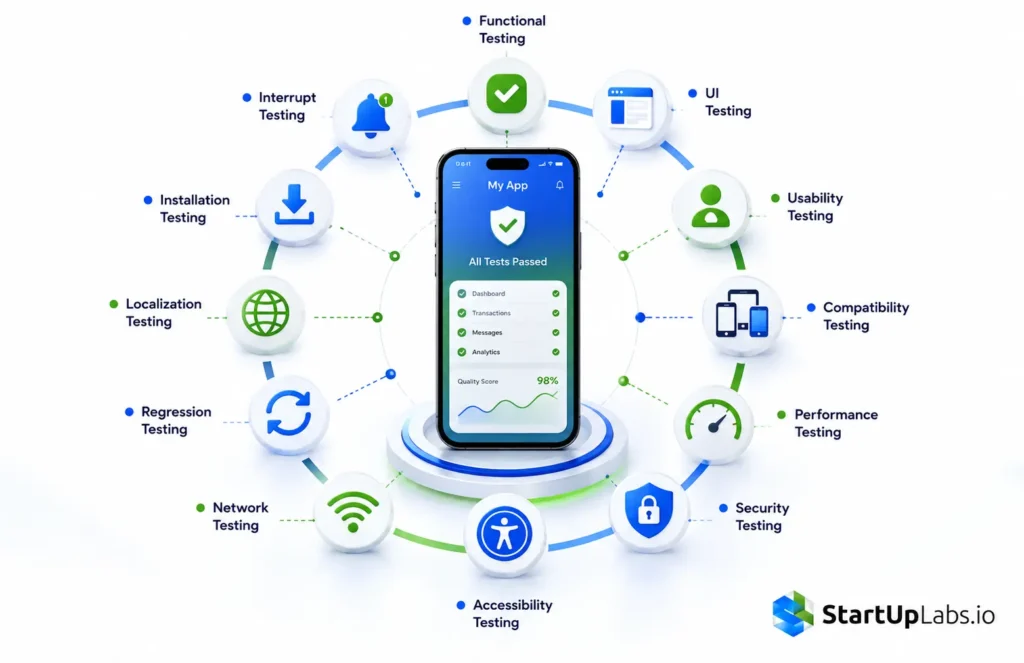
Types of Mobile App Testing

Mobile application testing is not a single test. It is a collection of testing approaches that address different quality risks.

1. Functional Testing

Functional testing verifies that app features behave according to requirements.

Typical scenarios include:

  • User registration and login
  • Password reset
  • Search
  • Forms
  • Shopping carts
  • Payments
  • Push notifications
  • File uploads
  • Location services
  • In-app purchases


The goal is simple: does the application do what it is supposed to do?

2. UI and Usability Testing

UI testing checks whether interface elements behave and display correctly.

Usability testing looks at whether users can complete tasks easily and intuitively.

Test areas include navigation, typography, buttons, touch targets, forms, error messages, gestures, screen orientation, and overall user flow.

3. Compatibility Testing

Compatibility testing checks how an application behaves across:

  • Different Android and iOS versions
  • Screen sizes
  • Device manufacturers
  • Hardware configurations
  • Browsers
  • Network conditions


This is especially important for Android because hardware and OS combinations can vary widely.

Call Now
Book Service Today!

4. Performance Testing

Mobile performance testing measures how efficiently an app behaves under different conditions.

Important metrics include:

  • App startup time
  • Screen response time
  • API latency
  • CPU utilization
  • Memory consumption
  • Battery usage
  • Network usage
  • Frame rate
  • Crash frequency


Performance should be tested under realistic conditions rather than only on powerful development devices.

5. Security Testing

Mobile security testing looks for weaknesses that could expose user accounts, credentials, payment information, API data, or other sensitive information.

Common areas include:

  • Authentication
  • Authorization
  • Session management
  • Secure storage
  • Encryption
  • API security
  • Sensitive data exposure
  • Insecure permissions
  • Certificate and network protection


For applications handling financial, healthcare, or personal information, security testing should be part of the development lifecycle rather than a final release check.

Call Now
Book Service Today!

6. Accessibility Testing

Accessibility testing verifies that users with different abilities can use the application effectively.

Test areas include:

  • Screen-reader support
  • Color contrast
  • Text scaling
  • Focus order
  • Touch target size
  • Accessible labels
  • Keyboard or assistive technology support where applicable

7. Network Testing

Mobile users constantly move between different network environments.

Test applications under:

  • Strong Wi-Fi
  • Slow Wi-Fi
  • 4G
  • 5G
  • Weak connectivity
  • Network switching
  • Temporary disconnection
  • Offline conditions

A robust app should fail gracefully rather than leaving the user with confusing errors or incomplete transactions.

8. Installation, Upgrade, and Uninstallation Testing

QA teams should test fresh installation as well as updates.

Important checks include whether:

  • Existing user data is preserved
  • Database migrations work
  • Permissions behave correctly
  • Updates complete successfully
  • Old versions transition correctly
  • Uninstallation removes application data as intended

9. Regression Testing

Regression testing verifies that existing functionality still works after code changes.

It becomes especially important when teams release frequently or maintain large applications with interconnected features.

Automated regression testing can reduce repetitive manual work and make frequent releases more manageable.

10. Localization Testing

Localization testing validates the application for different languages, regions, formats, currencies, dates, and content lengths.

For a U.S.-focused product, this may include currency formatting, time zones, addresses, ZIP codes, phone numbers, and region-specific user flows.

11. Interrupt Testing

Mobile applications can be interrupted by calls, notifications, alarms, background processes, low battery, or changes in connectivity.

Testing should verify that the application recovers correctly after these interruptions.

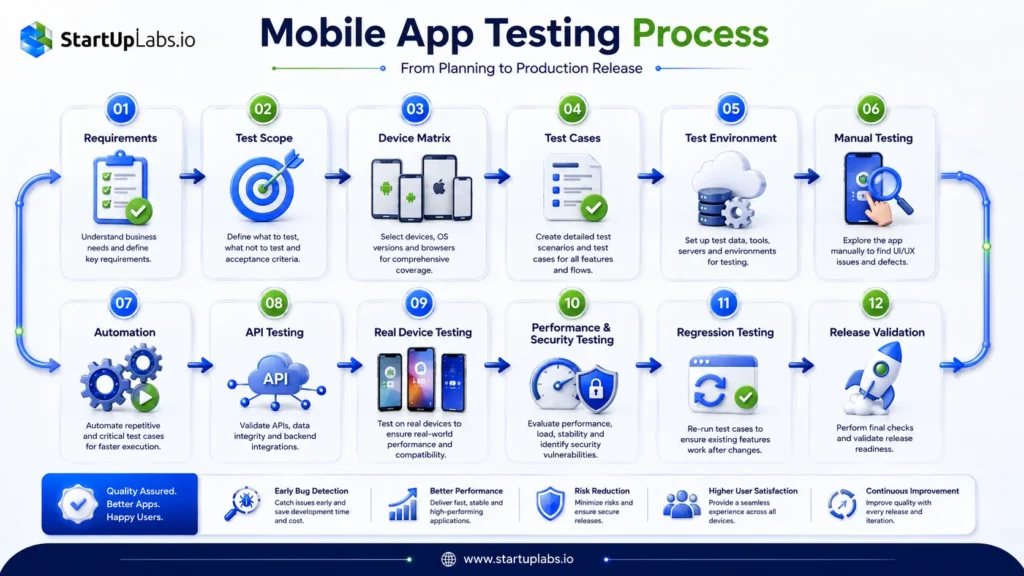
Mobile App Testing Process: Step by Step

Mobile App Testing Process

A reliable mobile testing process starts before the first test case is executed.

Testing should also be integrated into the broader mobile app development process, rather than treated as a final step before launch.

1. Understand Requirements

Identify business requirements, target users, supported platforms, critical workflows, integrations, and technical constraints.

2. Define the Testing Scope

Determine what needs to be tested and what risks matter most.

A banking app, food delivery app, social platform, and healthcare application will have different testing priorities.

3. Build a Device Matrix

Define the devices and operating-system combinations that matter to your users.

Instead of attempting to test every device, prioritize based on:

  • User analytics
  • Market share
  • Customer requirements
  • Supported OS versions
  • Business-critical devices
  • Historical defect data

4. Create Test Scenarios and Test Cases

Turn requirements into testable scenarios.

For example:

Scenario: User completes checkout.

Test cases should cover valid payment, invalid payment, network interruption, expired session, order confirmation, retries, and duplicate submission prevention.

5. Prepare the Test Environment

Set up test builds, APIs, databases, test accounts, devices, emulators, simulators, and required integrations.

6. Perform Manual Testing

Manual testing remains valuable for exploratory testing, usability, visual validation, unusual workflows, and areas where human judgment is important.

7. Automate Suitable Tests

Automate repetitive, predictable, high-volume workflows such as regression tests and critical user journeys.

8. Test APIs and Backend Services

A mobile UI can appear correct while the underlying API fails. Testing mobile applications should therefore include backend and API validation where applicable.

9. Test on Real Devices

Emulators and simulators are useful, but real-device testing reveals hardware, battery, camera, GPS, network, performance, and device-specific issues that virtual environments may not fully reproduce.

10. Run Performance and Security Testing

Evaluate responsiveness, resource usage, crashes, data protection, authentication, and API behavior before release.

11. Execute Regression Testing

Run the relevant regression suite after significant changes and before production releases.

12. Validate the Release

The final stage should verify installation, upgrade behavior, critical workflows, environment configuration, and release readiness.

How to Build a Mobile App Testing Strategy

A mobile testing strategy should be risk-based rather than simply “test everything.”

Start by identifying the workflows that can cause the greatest business or user impact.

For example, an e-commerce application should prioritize:

  • Login and account access
  • Product search
  • Cart functionality
  • Checkout
  • Payment
  • Order confirmation
  • Notifications

A useful testing strategy should define:

  • Supported platforms
  • Device coverage
  • Manual vs. automation scope
  • Regression coverage
  • Performance requirements
  • Security requirements
  • Test environments
  • Release criteria
  • Defect severity and prioritization


The objective is not to maximize the number of tests. It is to maximize meaningful coverage against real product risk.

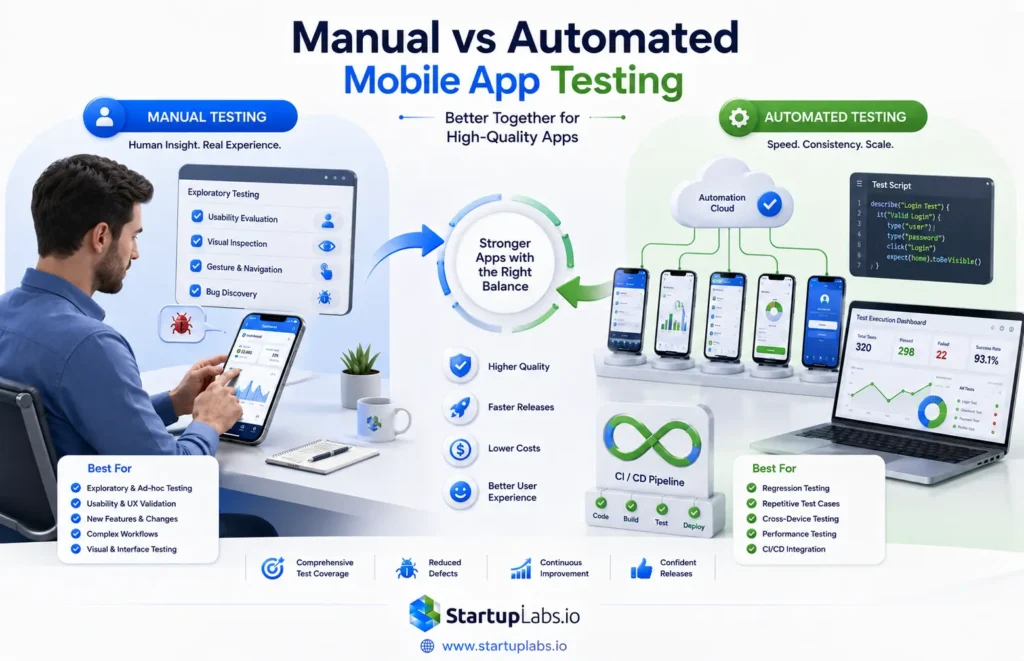
Manual vs. Automated Mobile App Testing

Manual Mobile App Testing vs Automated Mobile App Testing

Manual and automated testing serve different purposes.

Manual Mobile App Testing

Manual testing is valuable for:

  • Exploratory testing
  • New features
  • Usability
  • Visual validation
  • Unusual scenarios
  • Early-stage products
  • Human-centered workflows


It allows testers to investigate behavior that may not have been anticipated in predefined scripts.

Automated Mobile App Testing

Automation works particularly well for:

  • Regression testing
  • Repetitive workflows
  • Smoke testing
  • Cross-device execution
  • Frequent releases
  • Stable test cases
  • CI/CD pipelines


Automation should not replace all manual testing. A practical QA strategy combines both.

Mobile App Test Automation

Mobile test automation allows teams to execute predefined tests consistently across multiple devices and environments.

A common automation workflow is:

Write test → Execute on device → Capture results → Report failure → Debug → Re-run

Popular technologies and tools include:

Appium

Appium is widely used for automating mobile applications and can support cross-platform automation.

Espresso

Espresso is commonly used for Android UI testing within the Android ecosystem.

XCUITest

XCUITest is used for automated UI testing of iOS applications.

Selenium and Mobile Web Testing

Selenium is primarily associated with web automation and can be useful for mobile browser testing scenarios.

Other Automation Options

Teams may also consider technologies such as Webdriver-based frameworks, React Native-focused testing solutions, and newer developer-oriented mobile test tools depending on the application architecture.

The right choice depends on the technology stack, coverage requirements, team expertise, CI/CD setup, and maintenance cost.

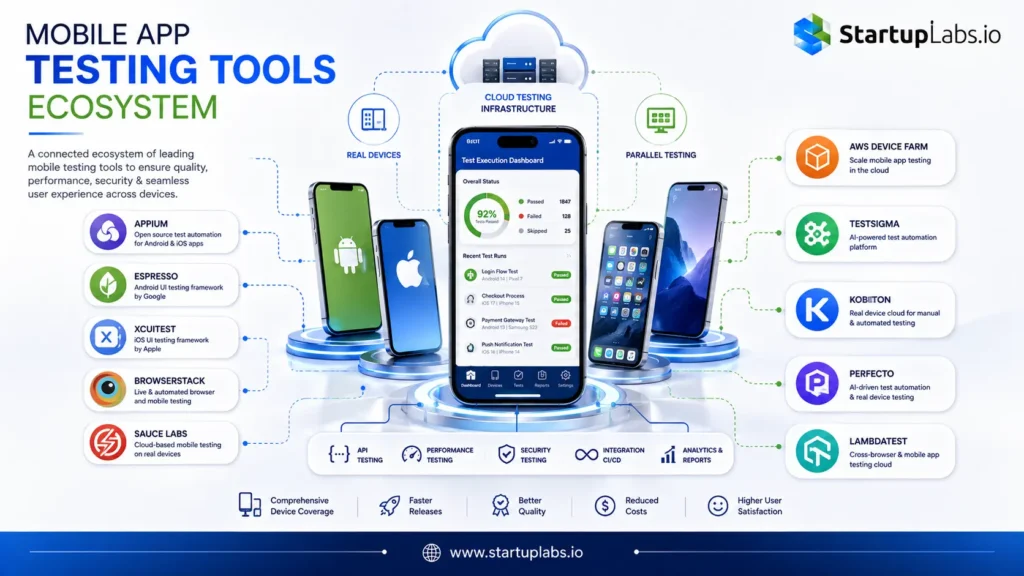
Best Mobile App Testing Tools

Mobile App Testing Tools ecosystem

A mobile testing tool should be selected based on the problem it solves rather than popularity alone.

Common categories include:

Tool or PlatformBest Use
AppiumCross-platform mobile automation
EspressoAndroid UI automation
XCUITestiOS UI automation
BrowserStackBrowser and real-device testing
Sauce LabsCloud-based test execution
AWS Device FarmDevice-based testing at scale
TestsigmaTest automation workflows
KobitonCloud device testing
PerfectoEnterprise mobile testing
LambdaTestCross-browser and mobile testing

How to Choose a Mobile Testing Tool

Evaluate each tool against:

  • Android and iOS support
  • Real-device availability
  • Automation framework compatibility
  • Device coverage
  • Parallel execution
  • CI/CD integration
  • Debugging capabilities
  • Reporting
  • Security requirements
  • Scalability
  • Total cost of ownership


The “best” mobile testing tool is the one that fits the application and QA process rather than the one with the longest feature list.

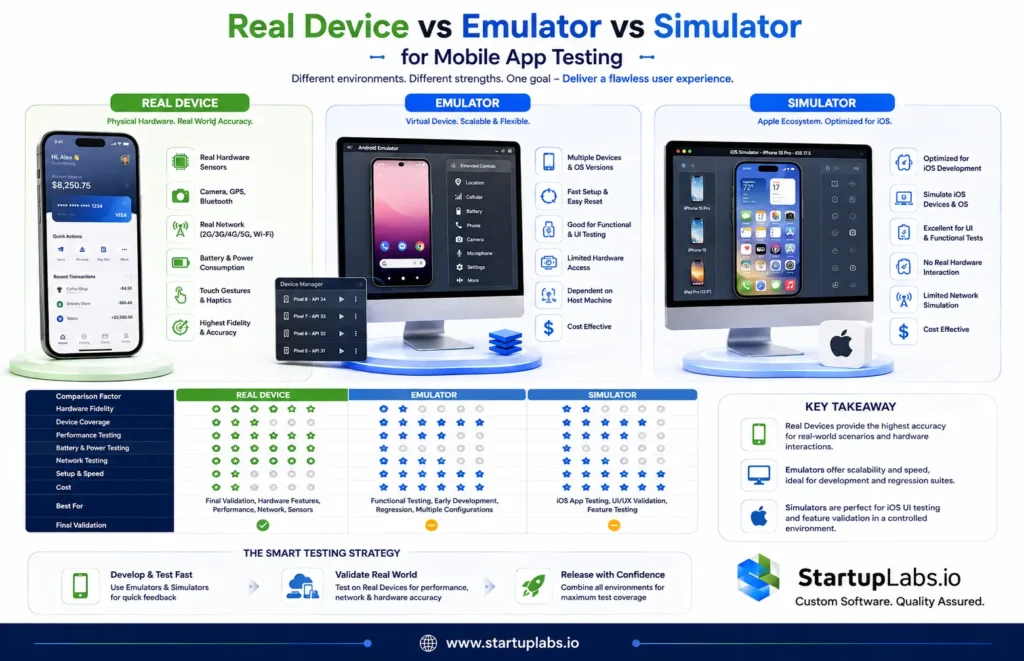
Real Device Testing vs. Emulator vs. Simulator

Virtual environments are excellent for fast feedback, but they do not completely replace physical devices.

FactorReal DeviceEmulatorSimulator
Hardware behaviorHighest fidelityLimitedLimited
Device coverageLowerHighHigh
Performance validationStrongUsefulUseful
Battery testingStrongLimitedLimited
Network testingStrongGoodGood
CostHigherLowerLower
Final validationEssentialSupporting roleSupporting role

When to Use Real Mobile Device Testing

Use real devices for final validation and areas involving hardware, performance, battery behavior, camera, GPS, Bluetooth, biometric authentication, notifications, or device-specific defects.

When to Use Emulators and Simulators

Use them for rapid development feedback, broad OS coverage, automation, debugging, and testing scenarios that do not require physical hardware.

The most effective strategy is usually both, not one or the other.

Real-device coverage is particularly important when developing cross-platform mobile applications, where the same product must provide a consistent experience across Android and iOS.

Android App Testing vs. iOS App Testing

Android and iOS require overlapping but distinct test coverage.

Android App Testing

Android testing should account for:

  • Multiple OS versions
  • Device manufacturers
  • Screen sizes
  • Hardware differences
  • Permissions
  • Background behavior
  • Notifications
  • Device-specific behavior

iOS App Testing

iOS testing should consider:

  • Supported iOS versions
  • iPhone and iPad behavior where relevant
  • Permissions
  • Notifications
  • App lifecycle
  • Device-specific UI behavior
  • Store release requirements


Testing requirements should also be considered alongside the architecture and technology choices made during Android and iOS app development.

The correct device matrix should be based on actual users and supported environments rather than testing every available model.

What Should You Test in a Mobile App?

A practical mobile QA checklist should include the application’s most important user journeys.

Core Functionality

Test registration, login, logout, password recovery, navigation, search, forms, and account management.

Payments and Transactions

Verify successful payments, failed transactions, retries, duplicate submissions, cancellations, refunds, and network interruptions.

Notifications

Test push delivery, notification content, deep links, permissions, and behavior when the app is foregrounded or backgrounded.

Hardware Features

Test camera, microphone, GPS, Bluetooth, biometrics, storage, and other device capabilities used by the application.

Offline and Network Behavior

Check what happens when connectivity is slow, unavailable, or changes during an operation.

Background Behavior

Verify background processing, session handling, synchronization, notifications, and recovery after the app is resumed.

Mobile Performance Testing

Mobile performance testing should evaluate the application under realistic usage conditions.

Key measurements include:

  • Startup time
  • Response time
  • Memory consumption
  • CPU usage
  • Battery consumption
  • API latency
  • Network usage
  • Frame rendering
  • Crash rate


Performance problems should be investigated across both powerful and lower-spec devices that are relevant to your audience.

Mobile Application Security Testing

Security testing should cover both the mobile client and the services it communicates with.

Important checks include:

  • Secure authentication
  • Authorization controls
  • Session handling
  • Secure local storage
  • Encryption
  • API protection
  • Sensitive-data exposure
  • Insecure logs
  • Weak permissions
  • Transport security


Penetration testing can be added when the application or business risk warrants deeper security assessment.

Common Mobile App Testing Challenges

Mobile QA teams commonly deal with:

Device Fragmentation

Different combinations of hardware, screens, manufacturers, and operating systems increase coverage complexity.

Network Variability

Users move between Wi-Fi and cellular networks and may experience poor connectivity.

Frequent OS Updates

New OS versions can change permissions, APIs, UI behavior, and device capabilities.

Automation Maintenance

Automated tests can become expensive to maintain when the application changes frequently.

Real Device Availability

Maintaining a large physical device lab can be difficult and expensive.

Third-Party Dependencies

Payment systems, analytics SDKs, authentication services, maps, and other integrations introduce additional failure points.

Mobile App Testing Best Practices

A strong mobile QA program should follow a few principles:

  1. Test early: Start QA during development instead of waiting for the release stage.
  2. Prioritize critical workflows: Focus first on the journeys that matter most to users and revenue.
  3. Use risk-based device coverage: Choose devices based on real audience data.
  4. Combine manual and automated testing: Human exploration and automation solve different problems.
  5. Test APIs with the mobile UI: Validate the systems behind the application.
  6. Use real devices strategically: Virtual environments should support, not completely replace, physical-device validation.
  7. Automate regression testing: Repeated tests are strong candidates for automation.
  8. Test under real conditions: Include network changes, interruptions, background behavior, and resource constraints.
  9. Include security and accessibility: Quality is broader than functionality.
  10. Integrate QA into CI/CD: Catch problems earlier and reduce release risk.

Mobile App Test Cases: Examples

Test Scenario Test Case Expected Result
Login Enter valid credentials User logs in successfully
Login Enter invalid password Clear validation message appears
Network Disable connectivity during request App handles failure gracefully
Payment Interrupt transaction Transaction remains safe and recoverable
Notification Tap push notification Correct destination opens
Upgrade Install new app version Supported user data is preserved
Offline Launch app without internet Appropriate offline behavior appears
Permission Deny camera access App handles permission denial correctly
Session Reopen app after inactivity Session behavior matches requirements
Orientation Rotate supported screen Layout remains usable

Mobile App Testing Checklist Before Release

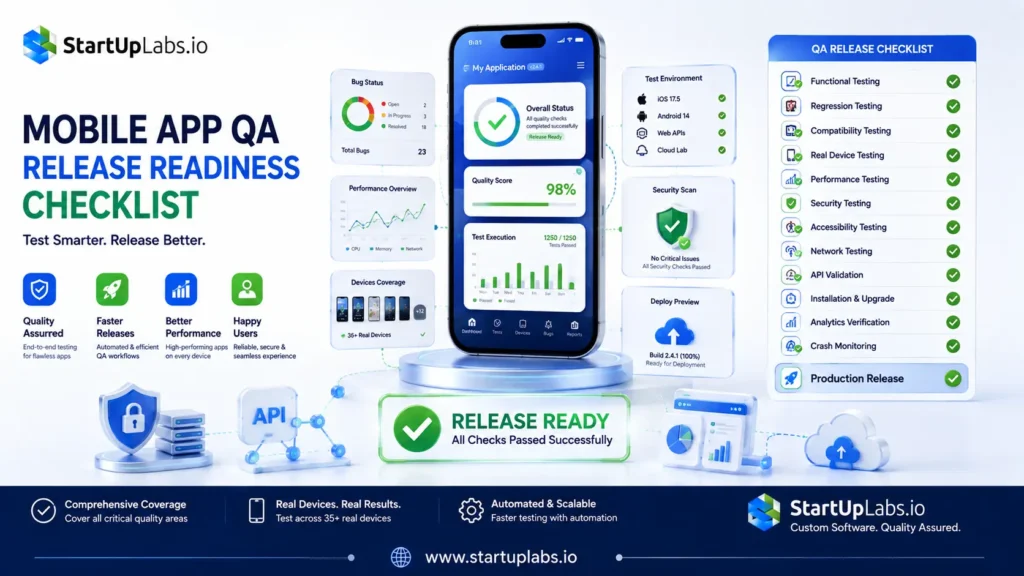
Mobile App QA Release Readiness Checklist

Before production deployment, verify:

  • Functional testing is complete
  • Critical workflows pass
  • Regression testing is complete
  • Android/iOS coverage matches the supported matrix
  • Real-device testing is complete for critical scenarios
  • Performance is within acceptable limits
  • Security checks are complete
  • Accessibility issues are reviewed
  • Network failure scenarios are tested
  • Installation and upgrade flows work
  • Analytics and crash reporting are functioning
  • Production configuration is validated

Mobile Testing in CI/CD

Modern development teams increasingly integrate automated mobile testing into CI/CD pipelines.

A typical workflow looks like:

Code Commit → Build → Automated Tests → Device Execution → Results → Quality Gate → Release

CI/CD integration allows teams to detect regressions earlier and reduce the amount of repetitive manual validation required for every release.

For larger test suites, parallel execution across multiple devices can significantly improve feedback time.

How Much Does Mobile App Testing Cost?

The cost of mobile app testing typically ranges from $3,000 to $25,000+ per testing project in 2026. A simple application with limited device coverage may cost less, while complex apps requiring automation, performance testing, security testing, and extensive real-device coverage can cost significantly more.

Estimated Mobile App Testing Cost

Testing ScopeEstimated CostTypical Coverage
Basic Testing$3,000–$8,000Functional, UI, basic device and regression testing
Standard Testing$8,000–$15,000iOS + Android, broader device coverage, regression, API and performance testing
Comprehensive Testing$15,000–$25,000+Automation, real-device testing, performance, security, compatibility and advanced regression
Ongoing QA$1,500–$5,000+/monthContinuous testing, regression, release validation and maintenance

These are indicative industry ranges, not fixed rates. Current 2026 market estimates also show that U.S.-based QA services can command higher hourly rates than offshore testing teams, while project pricing depends heavily on scope and coverage.

What Determines Mobile App Testing Cost?

Several factors can increase or reduce the final testing budget:

  • App complexity: More features and user workflows require more test scenarios.
  • Platform coverage: Testing both Android and iOS increases the testing scope.
  • Device matrix: More devices, screen sizes, manufacturers, and OS versions require additional coverage.
  • Automation: Building and maintaining automated test suites requires an initial investment but can reduce repetitive regression effort over time.
  • Real-device testing: Physical or cloud-based device access adds infrastructure costs.
  • Performance testing: Load, stress, memory, CPU, battery, and network testing require additional tools and engineering effort.
  • Security testing: Applications handling payments, healthcare data, or sensitive user information may require deeper security validation.
  • Release frequency: Apps released weekly or continuously generally need ongoing QA and automated regression coverage.

How to Choose a Mobile App Testing Company

When evaluating a mobile QA partner, look beyond basic manual testing capability.

Check whether the team has experience with:

  • Android and iOS testing
  • Mobile automation
  • Real-device testing
  • API testing
  • Performance testing
  • Security testing
  • CI/CD integration
  • Regression strategy
  • Cross-platform applications
  • Complex third-party integrations
 

For example, StartUpLabs works with businesses on custom software and mobile application development, where QA considerations such as cross-platform compatibility, automation, API testing, performance, and release validation can be incorporated into the product development lifecycle.

Ask potential QA partners for evidence of relevant project experience, testing methodology, reporting practices, device coverage, and the approach used to prioritize and resolve defects.

Testing is only one part of the product lifecycle. Teams planning a new application should also consider architecture, UX, development, deployment, and post-launch maintenance as part of the broader mobile app development lifecycle.

Conclusion

Mobile app testing is most effective when treated as a continuous quality process rather than a final pre-release activity.

A strong approach combines functional testing, usability, compatibility, automation, real-device testing, performance, security, accessibility, API validation, and regression testing.

The goal is not to test every possible device or create the largest possible test suite. The goal is to identify the risks that matter most, cover the environments used by real customers, and catch important failures before they reach production.

For modern mobile products, the most practical model is:

Plan → Test Early → Automate Repetitive Work → Validate on Real Devices → Test Critical Risks → Integrate with CI/CD → Release with Confidence.

FAQs

1. What is mobile app testing?

Ans: Mobile app testing is the process of verifying an application’s functionality, usability, performance, security, compatibility, and reliability across supported mobile devices and operating systems.

Ans: The major types include functional, UI, usability, compatibility, performance, security, accessibility, network, installation, regression, localization, and interruption testing.

Ans: Commonly used tools include Appium, Espresso, XCUITest, BrowserStack, Sauce Labs, AWS Device Farm, Testsigma, Kobiton, Perfecto, and LambdaTest. The right choice depends on the application and testing requirements.

Ans: It can be both. Manual testing is valuable for exploratory, usability, and visual testing, while automation is effective for regression, repetitive workflows, and frequent releases.

Ans: Yes. Emulators and simulators are useful for fast and broad coverage, but real devices are important for validating hardware behavior, performance, battery usage, connectivity, and device-specific issues.

Ans: Create a supported device and OS matrix, execute functional and non-functional tests, combine manual and automated testing, and validate critical workflows on representative real devices.

Ans: Mobile test automation uses software frameworks and testing tools to execute predefined tests automatically on mobile applications and devices.

Ans: An emulator generally attempts to reproduce a device environment more broadly, while a simulator models aspects of a device or operating-system environment. Both are useful for development and testing, but neither completely replaces physical-device testing.

Like This Blog? Share With Others

About the Author
Author Image

StartUpLabs Team

The StartUpLabs Team consists of technology and digital marketing experts passionate about helping businesses grow. We share industry insights and best practices in software development, AI, web and mobile solutions, and digital marketing.